The Spring Strategy Is Now Live in AutoPilot Trader
Spring is live in AutoPilot Trader today. If you are an active APT annual license holder, it is already in your account, ready to configure and run. No extra charge. No upsell. Included.
That is how every new strategy in APT works. When a strategy clears development and validation, it ships to every active license. What you paid for today includes what we release tomorrow.
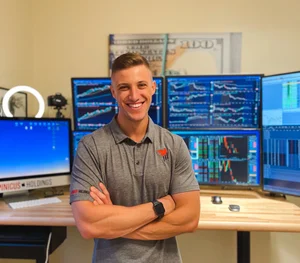
Spring is the setup I have traded discretionarily for years. If you watch the daily livestreams on YouTube or trade with us In the Thinktank, you have seen me take it. Nearly every time the conditions are right, I am looking for an entry. The goal with this development cycle was to take that repeatable read and turn it into a fully automated strategy, one that handles entries, management, and exits without anyone at the screen.
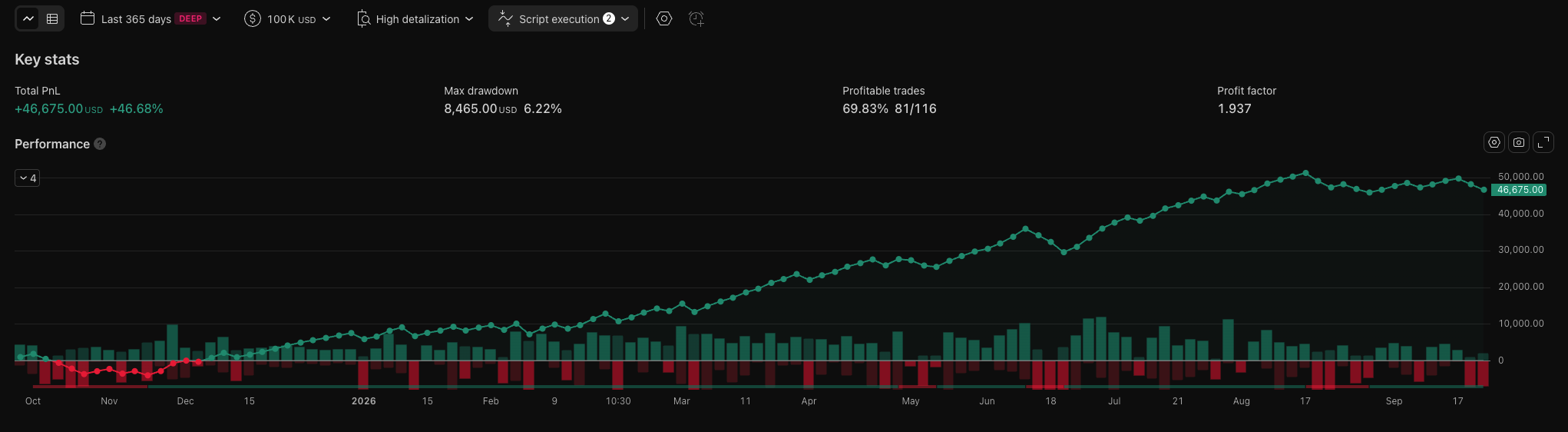
APT - Spring backtest, 5min chart, 365 day lookback
Spring Is Fully Automated
The automation handles the full trade from trigger to close. Entries, stop management, and exits all run without any input from you. Once the system is live, you are not involved in any individual decision.
The structure is different from the Two Hour Trader framework. THT scales out of winners in thirds, locking partials along the way to try to capture trend moves. Spring does not do that. It is all in and all out: one entry, one full profit target or one full stop. No partial exits.
Spring and THT are not correlated. They behave independently of each other. That separation is the point. Two uncorrelated strategies running together give you something more durable than two strategies that move in the same direction.
Honest Accounting of Launch Day
I want to be upfront about what happened this morning.
The 5-minute Spring automation took a long setup and stopped out. At the same time, I was in the same setup on the 1-minute chart on the discretionary side. My trade was a winner.
Same setup family. Different timeframes, different clocks, different outcomes. That is what handing a discretionary edge to an automation looks like. The automation follows its rules on its timeframe. My discretionary read runs on mine. On any given day those results will diverge.
Every trade the automation takes goes straight to the performance page. Nothing gets filtered out because it lost.
Two Timeframes
Spring runs on two timeframes: the 2-minute and the 5-minute. The correlation between them is about 0.1, which means they are effectively uncorrelated. They will produce separate equity curves, separate drawdown periods, and separate runs of strength. When one is struggling, the other may not be.
If you want to run both timeframes in one account, put one on NQ and the other on MNQ. You cannot run both on the same instrument inside a single account. There is a real risk they conflict at the order level, and that is not a situation you want to deal with mid-session.
Running Spring Alongside THT
If you are already running the Two Hour Trader automation and want to add Spring, you need separate accounts. Spring and THT can be in opposite directions at the same time. Long on one, short on the other. If both are on the same account against the same instrument, they will interfere in ways you did not plan.
On Tradovate, the clean path is a subaccount. Under the same login you can open a second account and run each strategy independently. That is how I have mine set up, and it is what I recommend.
The prop firm situation is different. Spring and THT must live at different firms. Because these strategies can hold opposite positions, running them at the same prop firm is treated as hedging. Prop firms ban accounts for that. One strategy per firm.
For automation generally, my recommendation is a personal cash account. Prop firms can work, but they add evaluation structures, drawdown limits, and monitoring rules that complicate running automated strategies. A cash account gives you cleaner control. If you are building toward a cash account, prop can bridge the gap, but the cash account is the better long-term vehicle for this.
Target Settings
The default target is Standard: a 1.5x ATR exit. That is what I run. On some trades the 1.5x ATR target will produce a negative risk-to-reward, depending on where the stop sits. Some traders are not comfortable with that. If you want at least 1:1 on every trade, the Extended setting uses a fixed 1R exit, and you will always be taking at least your risk amount on the target side. Extended is for the 5-minute only. Leave the 2-minute on Standard.
The Risk Ceiling is off by default, and I do not use it in my own setup. What it does: set a maximum dollar risk per trade. If a given trade's planned risk exceeds that ceiling, the automation will skip the trade at smaller sizes or scale the position down to fit within the cap at larger sizes. When volatility expands and stops widen substantially, this keeps individual trade exposure in check. Worth reviewing if you are working with a smaller account or tighter parameters.
Sizing
The performance page has a built-in risk calculator. Put in your account size and the maximum drawdown you can absorb, and the calculator tells you what sizing would have survived the worst historical stretch on record.
Size for durability. The calculator is not projecting your future returns. It is stress-testing whether your sizing would have made it through the roughest period in the simulated history. Start there.
Performance page and sizing calculator: powertrading.group/apt-performance
What to Expect
Spring is regime-dependent. It does not trade every day. When the right conditions are not present, there is no trade, and that silence is the system working correctly. It is built to wait.
Red months are on the performance page, printed at the same size as the green months. The full CSV files are free to download before you decide anything. The data is updated monthly; September figures will be up by end of this week.
Those of you who trade the discretionary side In the Thinktank already know I talk about regime dependency in the morning sessions. Certain setups work only in certain conditions. Spring is no different: the code looks for specific conditions, and if they are not there, it stands aside.
"I have been in about five to seven different trading groups. PTG has by far been the most helpful in my trading career. They teach simple strategies that work, don't push the next program on you, and actually answer questions. I'm also part of their APT bot, which has been amazing." - Scott Rushing, verified Trustpilot reviewer
What Is Next
Spring is the second strategy inside AutoPilot Trader. We already have more in development.
My goal for the next one is a strategy that trades closer to once a day. Spring and THT both require specific conditions to align before they trigger, so neither of them runs daily. I want the next release to have a different cadence, something that is in the market more regularly. When it clears validation, it will ship to every active APT license at no extra cost, same as today.
Watch the Launch Video
Get Started
Full simulated backtest record, sizing calculator, and downloadable CSVs: powertrading.group/apt-performance
AutoPilot Trader: powertrading.group/autopilot-trader
Trading the discretionary side and want to see the Spring setup live before automating it? I trade it regularly In the Thinktank.
Questions on setup or configuration? Drop them in the comments on the launch video or reach out directly.